What Is Geometry Healing and Why Every Simulation Depends on It
In the world of high-stakes engineering, the bridge between a brilliant 3D design and a functional physical product is simulation. Whether it’s testing the aerodynamics of a new electric vehicle or the structural integrity of a medical implant, engineers rely on Finite Element Analysis (FEA) and Computational Fluid Dynamics (CFD) to predict real-world behavior.
However, there is a silent saboteur that often halts these simulations before they even begin: poor geometry.
This is where Geometry Healing comes into play. It is not just a cleanup task; it is a critical phase of the digital thread that ensures the mathematical models we build are actually solvable.
What Is Geometry Healing? The “Digital Surgery”
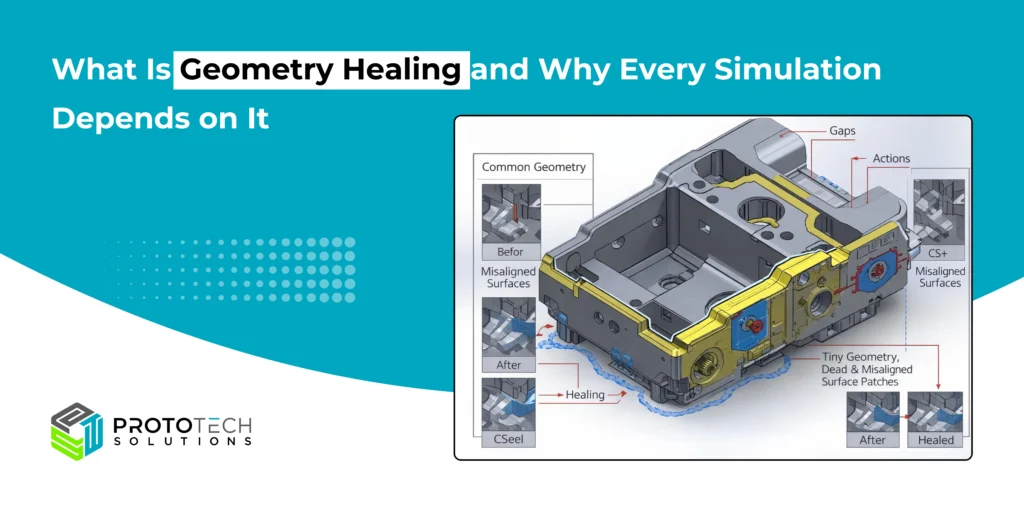
At its core, geometry healing is the process of identifying and repairing defects in a 3D CAD model to make it suitable for downstream engineering applications.
When a designer creates a model in a CAD tool like SolidWorks, CATIA, or NX, the primary goal is often aesthetic or manufacturing-focused. However, when that file is exported (often as a STEP, IGES, or STL file) and imported into a simulation environment, small mathematical discrepancies arise.
Geometry healing acts as a “digital surgeon,” stitching together gaps, removing redundant faces, and aligning edges so that the simulation software views the object as a single, watertight “manifold” volume.
Common Geometric Defects
Before we can heal a model, we must understand the “wounds.” Common issues include:
- Sliver Faces: Extremely thin, long surfaces that make it impossible to create a high-quality mesh.
- Cracks and Gaps: Tiny openings between surfaces that prevent the software from recognizing a solid volume.
- Self-Intersections: Where two surfaces occupy the same space, causing mathematical singularities.
- Non-Manifold Topology: Complex junctions where more than two surfaces meet at a single edge, confusing the simulation solver.
Why Every Simulation Depends on Geometry Healing
You might wonder, “Can’t the simulation software just ignore a tiny gap?” The short answer is no. Here is why geometry healing is the non-negotiable foundation of CAE (Computer-Aided Engineering).
1. The Necessity of a High-Quality Mesh
Simulation works by breaking a complex shape into millions of tiny elements (tetrahedrons or hexahedrons) called a mesh. If a geometry has a “sliver face” or a microscopic gap, the meshing algorithm will try to cram elements into that tiny space. This leads to highly distorted elements that cause the simulation to crash or produce “garbage” results.
2. Ensuring Numerical Convergence
For a simulation to finish, the underlying physics equations must “converge”—meaning they find a stable mathematical solution. Geometry errors introduce “noise” into these equations. A model that hasn’t been healed often results in “divergence,” where the computer spends hours calculating only to tell you that the math doesn’t add up.
3. Interoperability and Data Translation
Engineers rarely use just one software. A part might be designed in one program, analyzed in a second, and optimized in a third. Each time a file is converted, the mathematical description of curves—NURBS (Non-Uniform Rational B-Splines)—can shift slightly. Healing ensures that the “intent” of the design survives the translation between different software kernels.
The Business Impact: Efficiency and Cost
From a project management perspective, geometry healing is a massive time-saver. Industry studies suggest that simulation engineers spend up to 80% of their time simply preparing and cleaning CAD data.
By implementing automated geometry healing tools and “clean” CAD practices, companies can:
- Reduce Time-to-Market: Spend more time iterating on designs and less time fixing broken files.
- Increase Accuracy: Reliable geometry leads to reliable physics, reducing the need for expensive physical prototypes.
- Enhance Collaboration: Smooth data exchange between design and analysis teams.
Geometry Healing in Different Types of Simulation
1. Structural and FEA Simulations
Small gaps, overlapping faces, or disconnected bodies can distort load paths and stress distribution. Geometry healing ensures correct part connectivity and load transfer.
2. CFD and Flow Simulations
Watertight geometry is mandatory. Even microscopic leaks can break fluid domains, causing incorrect pressure and velocity results.
3. Thermal and Multiphysics Simulations
Thermal continuity between parts depends on a properly connected geometry. Healing ensures accurate heat transfer across interfaces.
How ProtoTech Solutions Empowers Your Simulation Workflow
As simulation becomes more integrated into the “Digital Twin” and AI-driven design space, mastering geometry healing will remain a core competency for any serious engineering firm.
Even with a clear understanding of geometry healing, the manual labor involved in preparing complex models can be a bottleneck for engineering teams. ProtoTech Solutions serves as a specialized technology partner that bridges the gap between raw CAD data and simulation-ready models.
With over two decades of expertise in 3D engineering software, ProtoTech provides the tools and services necessary to automate “digital surgery” and ensure your simulations are built on a rock-solid foundation.
Our Core Interoperability & Healing Capabilities:
- Automated Model Repair: We resolve broken geometries, missing surfaces, and non-manifold errors that typically cause FEA/CFD solvers to fail.
- Custom CAD Plugins: Our developers build bespoke exporters and importers for platforms like AutoCAD, Revit, SolidWorks, and 3ds Max, ensuring high-fidelity data exchange without the “mesh noise.”
- Precision Data Translation: We utilize advanced SDKs (such as HOOPS Exchange and Open Cascade) to translate CAD kernels accurately, preserving design intent across multi-software ecosystems.
- Simulation-Ready Validation: We provide automated validation tools that check for “watertight” integrity and geometric continuity before you hit “Run” on your analysis.
Ready to clean up your workflow? Contact our experts today for a consultation or to request a custom demo of our geometry healing solutions.